
OnCue turns your site into a live newsroom. Your team posts from Slack, Telegram, SMS, or Messenger, and your audience watches the story unfold on a page you host, style, and control. Built for WordPress first — and it also works with Ghost and static sites.
Bring your own keys · Bring your own AI · No SaaS lock-in
Made For
Indie Creators• Journalists• Marketing Teams• Event Professionals• AnalystsDifferent jobs, same tool. Here's what OnCue does for each.
Run product drops, launch days, AMAs, and watch-alongs live on your own site — and turn viewers into participants instead of a comment count on someone else's platform.
Post breaking updates from your phone over Telegram or plain SMS — no CMS login on the courthouse steps. Your archive lives on your domain, cited and timestamped.
Post from the launch Slack channel, let every published update land in Teams or Google Chat on its own, and give customers a branded live page to follow.
Cover conferences, matchdays, earnings calls, and keynotes as they happen. The live page carries your polls and your sponsors — and it stays up afterward as the record people cite.
No new dashboard for your team to learn, and no content leaving your site. This is the whole loop.
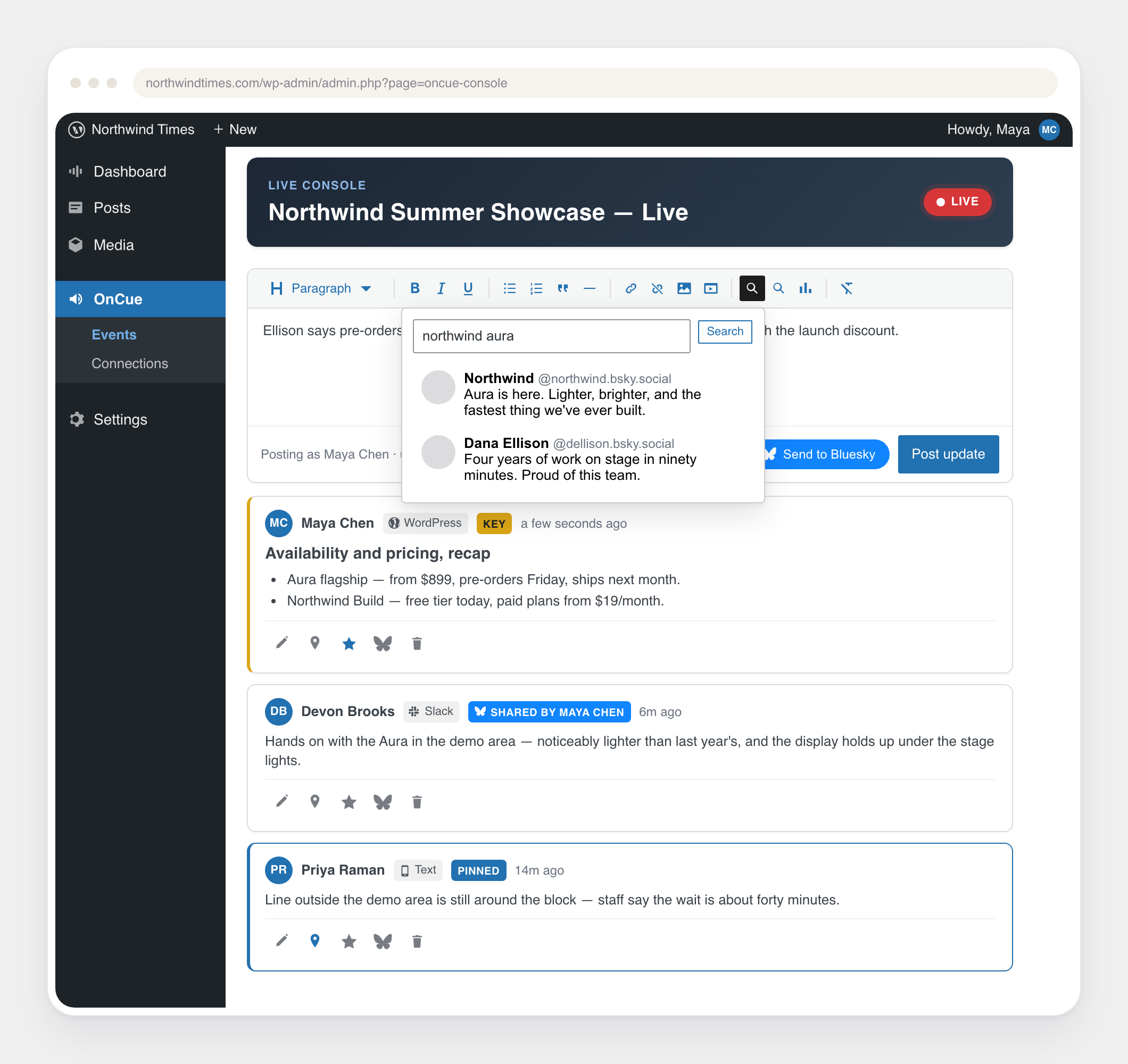
A message in the connected channel is the update — text, photos, and video. No new tools to learn.
Each message becomes a published update under the author's name — held for review first if you want.
Updates appear on your page without a refresh — and can share themselves to the channels you pick.
Setup is three steps: create an event in WordPress, drop the OnCue block into a post, and connect a channel. The Admin Guide walks through every click.
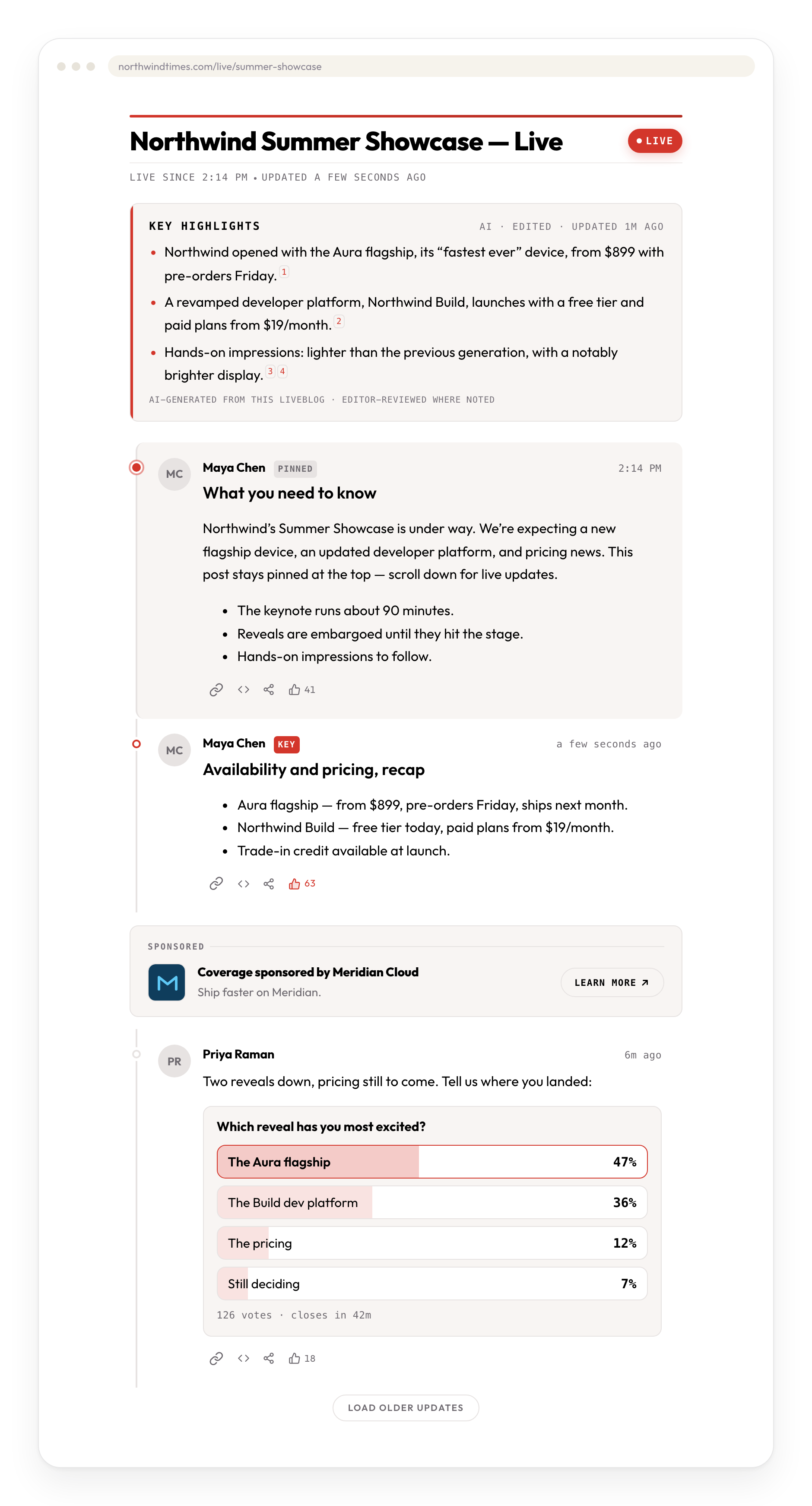
Your audience gets a fast, styled page on your own domain. Your team gets a console built for the pace of a live event — in your WordPress admin, where you already work.
Publish on Ghost, Hugo, Next.js, or plain HTML? Run OnCue as a small live engine on a subdomain you own. Your team still posts from chat, and the full stream — or any single update — embeds on your site with a copy-paste snippet.
A lean core that's always on, plus modules you turn on only when you need them. A module you haven't enabled adds nothing at all.
Live updates served by your own server — no third-party service in the middle. Readers get a page that's fast, crawlable, and styled by your theme.
Contributors file from Slack, Telegram, SMS, or Messenger — text, photos, and video, with their own byline. No CMS login required in the field.
A cited, auto-refreshing summary grounded only in your event's own updates — no made-up facts or links. Bring your own key for Claude, OpenAI, or Gemini, or point it at a model you host yourself. Editors can edit or pin every line.
Drop a poll into any update and watch the votes come in live. Readers can thumbs-up individual updates without signing in, and the counts keep climbing while the page is open. Then let every entry travel as a rich share card set in your own typeface.
Search public Bluesky posts and YouTube videos about your event right from the composer, and drop the best ones into the stream without leaving the console.
Every published update can post itself into your team's Slack and out to Signal, Teams, and Google Chat — no copy-pasting, no duplicates. The moments you choose thread onto your Bluesky account, each one signed off with the event's official hashtag so the whole thread is findable under a single tag.
An optional review step, set per event, holds contributors' updates until an editor clears them — whichever app they came from — so an open channel never means an open mic.
Sell the moment: clearly labeled sponsor cards appear between updates at a rhythm you set, with optional start and end dates. Or plug in your own ad stack and let it fill the slots.
Per-event stats work out of the box, measured on your own server and stored in your own database. Collection is cookieless and keeps no personal data — visitor counts use a daily-rotating fingerprint, and IP addresses are only ever used to derive an approximate country, never saved. One screen shows readers, engagement, sources, devices, and poll results. Prefer GA4? Point Stats at your own property instead.
Give each liveblog its own accent, card background, borders, and muted text with a color picker that flags hard-to-read choices, then run it contained or full width. The typeface always follows your theme, so coverage looks like it belongs on your page.
Paste a link in the console, or share one from Slack or Telegram, and it renders as a card with the headline, description, image, and source. No extra step, and no bare URLs sitting in your coverage.
Every key you paste is encrypted at rest, and the encryption key is kept outside your database. Your content and credentials never touch our servers.
OnCue ships the connections — the accounts and keys are yours.
Every connection runs on credentials you create — so usage bills at each platform's own rates, with no middleman and no markup. Keys are encrypted at rest, and the encryption key stays out of your database.
OnCue is a lean core plus optional modules. A module you haven't enabled adds nothing — no settings clutter, no background jobs, no open doors. Turn features on as your coverage grows.
Restyle the reader with CSS variables, hand sponsor slots to your own ad stack, send reader activity to any analytics tool, and run AI highlights on any model with an OpenAI-compatible server — even one on your own hardware.
Bring your own keys. Nothing turns on until you connect your own accounts — that's the whole model. How BYOK works → · Step-by-step setup guide →
Install OnCue straight from the WordPress plugin directory: search for "OnCue Liveblogging" under Plugins → Add New, click Install, activate, and you're live. It's free and open source, and a staging site is the smart place to start.